Published
Quick answer
To learn how to listen to sleep stories offline, download the stories you want onto your device while you have wifi, then switch on offline or airplane mode before bed.
Key takeaways
- Download stories over wifi earlier in the evening, not at the last minute.
- Offline mode keeps a story playing through a weak signal or airplane mode.
- Background playback lets the story keep going with the screen locked and dark.
- A sleep timer stops the story for you, so the phone can stay face down.
- Downloaded stories and sounds take up storage, so clear old ones occasionally.
Learning how to listen to sleep stories offline mostly comes down to one habit: download the story before you need it, while you still have a signal. Once it is saved to your device, a weak connection, a flight, or airplane mode will not interrupt it halfway through.
How do I listen to sleep stories offline?
The short version is that you prepare earlier in the evening, not at the moment your head hits the pillow. A story that still needs to buffer at eleven at night is a story that will stall right when your mind is finally settling.
See also: App for Adults Who Cant Sleep: What Actually Helps.
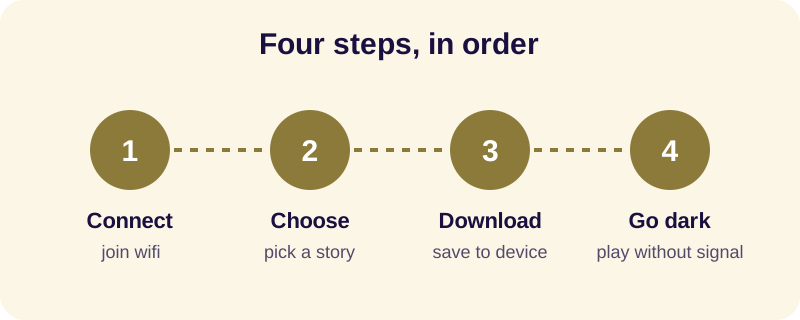
- Connect to wifi earlier in the evening, while you are still moving around the house and not yet trying to fall asleep.
- Open the story or sound you want for tonight — a narrated Jataka tale, an episode from the life of the Buddha, or a Dhammapada verse read slowly.
- Tap the download option next to it and wait for it to finish saving to your device before you set the phone down.
- Switch on airplane mode or offline mode before you get into bed, so no notifications arrive mid-story.
- Set a sleep timer a little longer than you usually take to drift off, and let the screen go dark while the story keeps playing.
What do I need to have ready before I go offline?
Offline listening removes the need for a live connection, but it still depends on a few things being in place before you turn the signal off. Getting these right once means you rarely have to think about them again.
The main pieces are simple: the story itself saved to your device, enough free storage to hold it, a sleep timer set the way you like it, and background playback switched on so the audio keeps going once your screen locks. None of this requires technical skill — it is closer to packing a bag the night before a trip than to configuring software.
Many people also like pairing a narrated story with a soft ambient layer — rain, ocean waves, or a singing bowl — and both the story and the sound need to be downloaded separately if you want the whole mix to work offline. If you have not settled on an app yet, it is worth reading a plain comparison of what different buddhist sleep apps actually offer before you commit storage space to one.
A short checklist
- The story and any ambient sound are both marked as downloaded, not just played once while online.
- Your device has enough free storage — check this occasionally if you download often.
- Background playback is turned on in the app's settings.
- Your phone's battery saver is not set to pause audio apps when the screen is off.
Why does offline listening actually help a restless mind at night?
The practical reason is obvious — nothing interrupts the story. The quieter reason is that a story which stutters, buffers, or drops out partway through does the opposite of what a bedtime story is for.
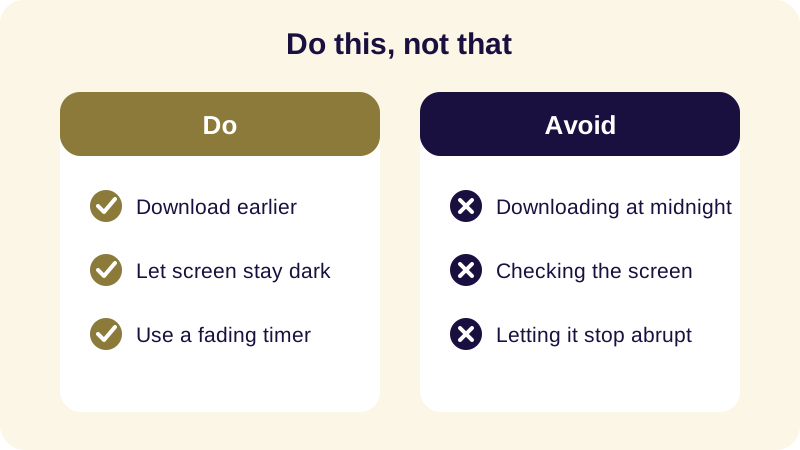
Much of what settles a mind at night is predictability: knowing the shape of what is coming, so there is nothing to brace for. A story that behaves exactly the same way every night — same narrator, same pace, no spinning wheel, no dropped signal — becomes part of the wind-down itself rather than another small uncertainty to track. This is the same reason a steady evening routine works better than an inconsistent one: the mind relaxes faster around something it already recognizes.
It helps, too, that the material itself is unhurried. Jataka tales of the Buddha's past lives, episodes of his search under the Bodhi tree, or a verse from the Dhammapada are not built for suspense. They move slowly toward a quiet resolution, which is a different job than keeping you hooked — and that is exactly what a reliable offline file lets you hear without interruption.
What should I do if a downloaded story won't play?
Most offline playback problems come down to one of three things: the download did not finish, storage ran out partway through, or a battery-saving setting is pausing audio in the background.
Check the download first — reopen the story while briefly back on wifi and confirm it shows as fully saved rather than partially there. If storage is the issue, remove an older story or sound you no longer use. If the story stops the moment your screen locks, look for a battery optimization setting on your phone that might be closing audio apps to save power, and allow the app to keep running in the background.
Offline listening is a small piece of setup, but it removes one more thing your mind has to half-track while it is trying to let go. Pair it with a slow wind-down practice and a story you already know the shape of, and the technical part mostly disappears into the background, which is exactly where you want it.
Frequently Asked Questions
How to listen to sleep stories offline on a phone?
Open the app while connected to wifi, find the story you want, and look for a download icon next to it. Tap it, let it finish downloading, and the story is saved to your device. After that, you can play it in airplane mode or with no signal at all.
Do downloaded sleep stories use a lot of storage?
A single narrated story is usually a small file, closer in size to a few songs than to a video. If you download many stories and ambient sounds over time, it is worth checking your storage settings occasionally and removing ones you no longer listen to.
Can I use a sleep timer with an offline story?
Yes. A sleep timer works the same way whether the story is streamed or downloaded, since it is just counting down on your device. Look for one that stops the audio on its own after a set time, so you never have to reach for the phone when your mind is close to sleep.
Why does my offline story stop playing when I lock my phone?
This usually means background playback is switched off, either in the app's settings or in your phone's battery-saving settings, which can pause audio apps to save power. Checking both settings once usually fixes it permanently.