Published
Quick answer
The fastest way to learn how to set an automatic stop timer for sleep audio is to open your listening app, tap the timer icon near play, choose a length, and start — playback stops on its own, with no fade and no phone check needed.
Key takeaways
- Most bedtime apps put the sleep timer right next to the play button, not buried in settings.
- Set the timer before you press play, not after you're already drifting off.
- Buddha Story's Sleep Timer pauses the story and sounds when time is up — it does not fade.
- Background playback keeps the timer running even after your screen locks.
- Pick a shorter length if you fall asleep fast, longer if your mind tends to race.
The short answer to how to set an automatic stop timer for sleep audio is simple: open the timer control inside whatever app you're using, choose a length, and start playback — the sound stops on its own at the end. Most apps built for bedtime listening put this control one tap away from the play button, so you never have to leave bed to switch it off.
What does an automatic stop timer actually do for sleep audio?
A sleep timer closes the gap between falling asleep and the audio continuing to run regardless. Without one, a story or a loop of rain sounds can keep playing for hours after you've drifted off, which wastes battery, can wake you later in the night, and leaves a phone warm under your pillow until morning. With a timer set, the audio plays for a fixed stretch of time — long enough to carry you toward sleep — and then it stops by itself, quietly, without anyone needing to reach over and tap anything.
See also: App With Sleep Timer That Stops Story Automatically.
This is different from your phone's screen lock or auto-lock setting, which only affects the display, not the sound. You can set a stop timer for sleep audio entirely separately from any screen settings, and the two work independently: the screen can go dark on its own schedule while the audio and its own countdown keep running underneath.
How do you set a sleep timer for sleep audio?
Across most apps built for this purpose, the steps are nearly identical. Look for a small clock or timer icon somewhere near the player controls — usually close to the play button itself, or tucked into a short menu attached to whatever is currently playing.
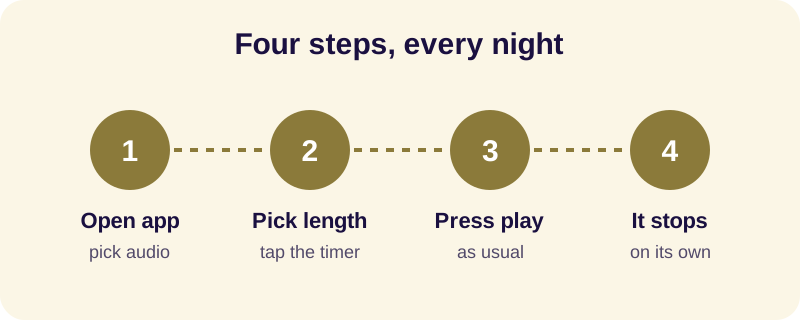
- Open the app and choose the story, chant, or ambient sound you want to fall asleep to.
- Find the timer icon, usually shown as a small clock near the play controls.
- Pick how long you want the audio to run.
- Press play as you normally would.
- Let the app stop the audio for you when the time is up — there is nothing left to check or switch off.
In Buddha Story, this control is called the Sleep Timer, and it offers four fixed lengths: 10, 20, 30 or 60 minutes. Picking one before you press play is the whole job — there is no custom length to fuss over, which keeps the decision quick on a night when you'd rather close your eyes than scroll through settings.
Should the audio stop instantly or fade out at the end?
Different apps handle the end of the timer differently, and it's worth knowing which kind you're using. Some fade the volume down gradually over the last stretch, easing you out of the sound a little at a time. Others cut off cleanly the instant the set time is reached, wherever the story or track happens to be.
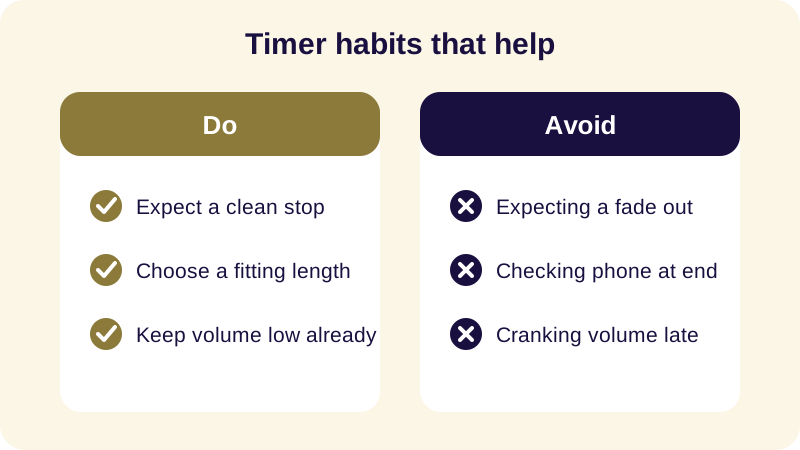
Buddha Story's Sleep Timer belongs to the second kind: it pauses the story and the sounds when the timer ends, with no fade-out. In practice this rarely matters, because by the time a sleep timer runs out most listeners are already asleep and never notice the stop at all. It does mean the narration can end mid-sentence rather than tapering away gently, which is worth expecting rather than being surprised by on your first night.
What happens if the screen turns off before the timer ends?
This is where background playback matters. A sleep timer for bedtime audio is only useful if the sound — and its countdown — keep running after the screen goes dark and the phone locks itself. Apps that support background playback handle this automatically: you can turn the phone face down, let the screen lock, and the timer still finishes right on schedule without any extra steps.
If audio stops the moment your screen turns off, that's usually a phone setting rather than the timer itself misbehaving. For a closer look at the settings involved, see our guide on how to play audio in the background while the screen is off. Buddha Story supports background playback by design, so locking the screen is the ordinary way to use it, not something you need to work around.
How long should you set the timer for?
There's no universal right answer here — it depends on how quickly your mind tends to settle. If you're usually asleep within a few minutes of lying down, a short setting is plenty; anything longer just plays quietly to an empty room. If your thoughts tend to circle for a while first, a longer setting gives them more time to wind down before the sound stops for good.
A fixed set of options — rather than a custom number you have to think about — can actually help on nights when you're too tired to decide anything at all. If racing thoughts are the main obstacle, pairing a longer timer with a slow story or a simple mindfulness practice often does more than adjusting the timer length alone would. Persistent sleep trouble is worth raising with a doctor rather than solved by timer settings; an automatic stop timer is a convenience for an ordinary restless evening, not a treatment for anything.
How does Buddha Story handle sleep timers?
Buddha Story was built around exactly this kind of bedtime listening, so the sleep timer sits where you'd expect it, right next to the story you're about to hear.
- Sleep Timer with four lengths — 10, 20, 30 or 60 minutes — chosen before you press play.
- Pauses, doesn't fade — when the timer ends, the story and sounds simply stop.
- Background playback — lock the screen and the timer keeps counting down underneath.
- Offline Mode — download a story in advance; see our guide on listening to sleep stories offline.
- Sound mixer — layer a story with rain, waves or singing bowls, all running under the same timer.
- No ads interrupting the countdown once the story has started.
Setting the timer is the small, practical part of the evening. What plays underneath it — a Jataka tale, a chapter from the Dhammapada, or simply the sound of rain — is the part that actually settles the mind enough to use the timer at all.
Frequently Asked Questions
How do I set a sleep timer for bedtime audio?
Open whatever app you're listening to, look for a timer or clock icon near the play controls, choose a length, and start playback as usual. The audio runs for that stretch of time and then stops on its own, so you don't need to stay awake to switch it off.
Does the audio fade out or stop suddenly when the timer ends?
It depends on the app. Some fade the volume down gradually; others cut off cleanly the moment the time is reached. Buddha Story's Sleep Timer pauses the story and sounds without a fade-out, so playback simply stops where it is — by then most listeners are already asleep.
What happens if my phone's screen turns off before the timer finishes?
A well-built sleep timer keeps running in the background even after the screen locks, as long as the app supports background playback. The countdown and the audio continue together, so locking your phone and turning it face down doesn't interrupt anything.
How long should I set the sleep timer for?
There's no single right length. If you usually fall asleep within a few minutes, a shorter setting is enough; if your mind tends to wander, a longer one gives it more time to settle. Many apps offer a small set of fixed lengths rather than a custom number, which keeps the choice simple.
Can I use a sleep timer with offline audio?
Yes, in most apps the timer works the same way whether the story or sounds are streamed or downloaded. If you plan to listen without a signal, download what you need in advance and the timer will still stop it for you at the chosen length.