Published
Quick answer
Yes, an app with sleep timer that stops story automatically exists: Buddha Story's Sleep Timer pauses the story and sounds at 10, 20, 30 or 60 minutes, with no fade-out.
Key takeaways
- The Sleep Timer offers 10, 20, 30 or 60 minute lengths, then pauses everything at once.
- It pauses rather than fades, so the audio is steady until the exact cutoff.
- Background playback and Offline Mode mean it works locked, face down, and with no signal.
- A timer and a calm story help an ordinary restless night; persistent problems need a doctor.
An app with sleep timer that stops story automatically does exist, and it works exactly the way it sounds: you pick a story, set a length, and the narration and sounds stop on their own so you don't have to.
This is a familiar problem for anyone who listens to a calming voice to wind down: the story is still running at two in the morning, or it loops for hours and drains the battery. A timer that pauses everything on its own solves exactly that, without you needing to stay awake long enough to switch it off yourself. It also solves a quieter problem — the small anxiety of wondering whether you'll remember to turn the phone off at all, which is itself one more thing for a tired mind to track.
Is there an app with a sleep timer that stops a story automatically?
Yes. Buddha Story, a narration app for Buddhist stories and calming sounds, includes a Sleep Timer built for this exact situation. You choose 10, 20, 30 or 60 minutes before you start listening, and when that time is up, the story and any background sound simply stop. Nothing keeps playing in the background, and nothing needs manual shutting off.
See also: Sutara App: What That Search Is Really Asking For.
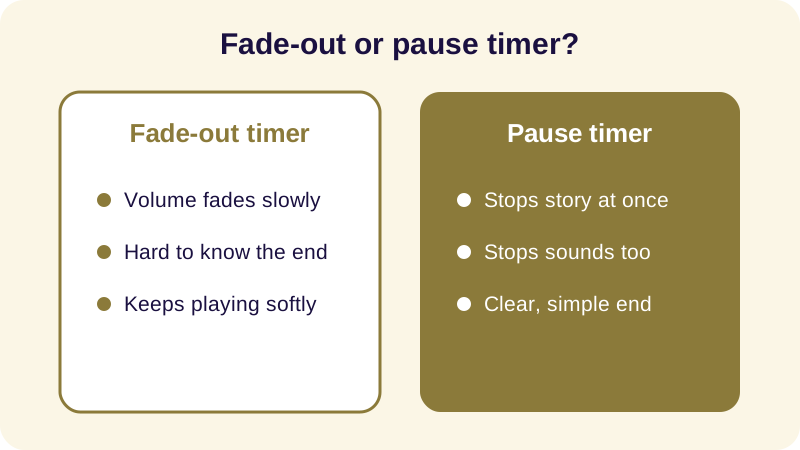
Not every timer behaves the same way, and the difference matters more at night than it seems. A timer that fades the volume slowly can still be audible for several more minutes, which is enough to tug a light sleeper back toward wakefulness. A timer that pauses outright gives you a clean, predictable stop: either the narration is playing, or it is silent, with nothing ambiguous in between. For someone who wakes at the smallest sound, that distinction is the whole point of choosing a timer in the first place.
How does the Sleep Timer actually work?
The mechanics are simple on purpose. Open a story or a sound mix, tap the Sleep Timer, and choose a length. From that point the app behaves like a quiet caretaker: it keeps the story at a steady volume until the chosen minute arrives, then it pauses the story and the sounds together. It does not fade them out — the audio plays at a constant level until the cutoff, then stops.
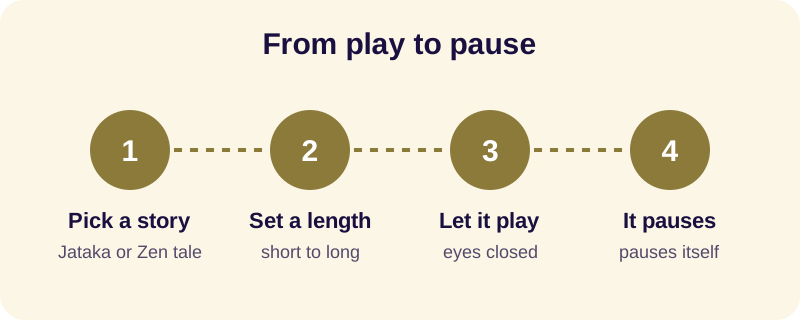
This also protects your battery and your attention. Background playback lets the story keep going if you lock the screen or put the phone face down, and Offline Mode means none of this depends on a signal reaching your bedroom. The Sleep Timer and Offline Mode together mean you can set everything up once, put the phone aside, and not touch it again until morning.
Choosing a length is mostly about knowing your own pattern. Someone who drifts off quickly rarely needs the longest option; someone who likes to lie and listen for a while before sleep arrives will want more room. A rough guide:
| Length | Suits |
|---|---|
| 10 minutes | Falling asleep quickly, a short wind-down |
| 20 minutes | A full short story before sleep |
| 30 minutes | A longer story or story plus sounds |
| 60 minutes | Reading-in-bed habits, slower winding down |
The simplest way to try this yourself:
- Open a story in the app.
- Tap the Sleep Timer icon.
- Choose a length: 10, 20, 30 or 60 minutes.
- Press play and set the phone down — the story pauses itself when the time is up.
What else helps you fall asleep besides a timer?
A timer only controls when the sound stops — what it plays matters just as much. Buddha Story narrates 90+ stories, including Jataka tales (the 547 birth stories of the Buddha in the Pali canon), episodes from the life of Siddhartha Gautama, Dhammapada verses, and Zen parables, all read slowly in English narration for listening with your eyes closed.
- A sound mixer for layering rain, ocean waves or singing bowls under the narration
- Guided Meditation for loving-kindness, body scan and breath awareness, for nights when a story feels like too much to follow
- No ads breaking the quiet partway through
These pieces work together rather than separately. A short Jataka tale with rain layered underneath, set to a 20-minute timer, gives you a beginning, a steady background, and a known end — three small certainties that a racing mind can lean on instead of filling the silence with its own worries. If you're choosing what to listen to rather than just how long, our guide to Buddhist stories for sleep walks through which kind of story suits a racing mind, and sleep meditation sounds covers pairing a story with rain or temple bells.
What if a timer alone doesn't fix a restless night?
A sleep timer, a calm story and a good sound mix can make an ordinary restless evening easier to settle into. They are not a treatment for insomnia, anxiety or any other condition, and Buddha Story is not a medical device. If sleeplessness is persistent or is affecting your days, that's worth raising with a doctor rather than solving it with an app alone.
For the practical side of staying asleep rather than just falling asleep, see our notes on playing audio with the screen off and on listening to sleep stories offline — both describe the quiet, hands-off setup a good sleep timer should give you. A timer that stops the story for you is a small thing, but on a restless night, a small thing that works without needing your attention is most of what helps. It removes one more decision from an evening that may already feel full of them, which is often exactly what a tired mind needs: fewer choices, not more.
Frequently Asked Questions
Does Buddha Story's sleep timer fade the audio or stop it instantly?
The Sleep Timer pauses the story and any background sounds the moment your chosen length ends; it does not fade the volume down gradually. You hear the narration at a steady level right up until the cutoff, then everything goes quiet in one step, giving a clear, predictable end to the night's listening.
What timer lengths can I choose in the app?
You can set the Sleep Timer to 10, 20, 30 or 60 minutes before you start a story or a sound mix. There is no custom length beyond those four options, which keeps the choice simple when you are half-asleep and just want to press one button and lie back down.
Will the story keep playing if I lock my phone?
Yes. Background playback lets the narration and sounds continue after you lock the screen or turn the phone face down, so you do not need to keep the display lit beside the bed. The Sleep Timer still pauses everything automatically once your chosen time is reached.
Does the sleep timer work without an internet connection?
Yes. Offline Mode lets you download stories and sound mixes in advance, so the Sleep Timer and narration both work with no signal needed once a story is saved to your phone, which is useful in a bedroom with patchy reception or with the phone in airplane mode.
Is this app only for falling asleep, or can it help later in the night too?
It is built mainly for winding down on an ordinary restless evening, not as a treatment for insomnia or any condition. If you wake repeatedly through the night or sleep problems persist, that is worth discussing with a doctor rather than relying on an app alone.