Published
Quick answer
An app for falling asleep without screen time should work through sound alone: pick a story, set a sleep timer, then turn the screen off and listen until you drift off.
Key takeaways
- Press play once, then turn the screen off — the story keeps going by sound alone
- A sleep timer stops playback after 10, 20, 30 or 60 minutes without any fade-out
- Downloading stories for offline listening avoids screen light from a weak signal
- Listening instead of scrolling removes the need to keep deciding what to look at
- Persistent sleeplessness is a question for a doctor, not an app
An app for falling asleep without screen time works like a dark room with a storyteller in it: audio only, screen face-down, nothing to look at. The sound carries on after you stop needing to see anything, which is the whole point of listening in the dark instead of watching in it.
Most people who search for this already know the problem. A lit screen in bed keeps the mind a little too awake, but an app still offers something useful: a story, a sound, a timer, a reason to stop scrolling for your own sake. The trick is using the app without letting the screen undo the calm it is supposed to bring.
How do you fall asleep without staring at a screen?
Press play, then turn the screen off. A screen-free sleep app only needs to be touched once a night: choose a story, choose a sound, set a timer, then lock the phone or turn it face down and close your eyes. Everything that happens after that point happens through your ears, not your eyes.
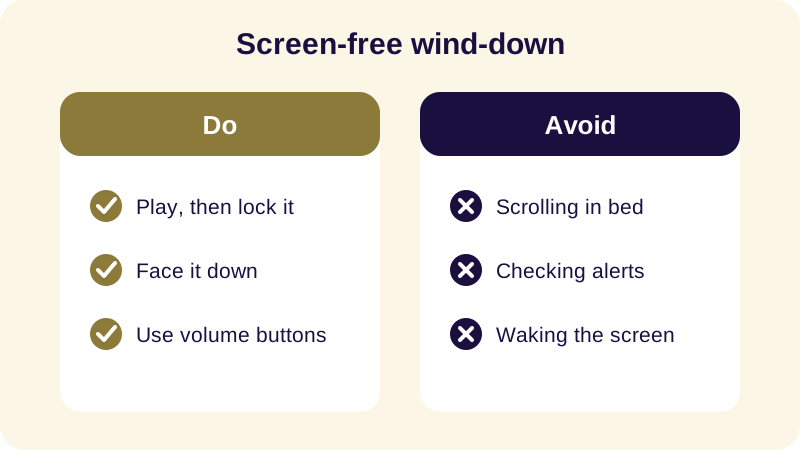
This is different from most apps, which assume you will keep looking at them. A good screen-free bedtime routine treats the display as something you touch for a few seconds at the start of the night and never again until morning.
Why does the screen itself keep you awake?
A lit screen keeps your eyes and attention working. Scrolling asks you to keep deciding what to look at next, which is a mild, constant kind of alertness that does not switch off the moment you set the phone down. Darkness removes that job completely — there is nothing left to decide, only something to listen to.
An audio-only bedtime app sidesteps this by design. You never have to look at it to know what is happening, so there is no reason for your eyes to open once you have pressed play. If your mind is the kind that keeps running through the day's conversations, a slow story or a quieter approach to a racing mind at night can help more than another round of scrolling ever will.
See also: App for Adults Who Cant Sleep: What Actually Helps.
What makes an audio story more sleep-friendly than a screen?
A story gives the mind one thing to follow instead of many things to choose between. Buddhist bedtime stories suit this particularly well because they move slowly and end quietly — there is no cliffhanger pulling you forward and no banner pulling you sideways.
Reading does the opposite of what you want at that hour: a lit screen nudges you toward brighter content, and following written words takes real effort even when the content itself is calm. Listening with your eyes closed asks almost nothing of you. You can lose the thread of the story completely and it keeps going without you, which is exactly the point — the goal was never to finish it, only to have somewhere quieter to put your attention while you drift off.
How do you set up a screen-free listening routine?
The setup takes about a minute and only needs doing once a night, before the lights go off.
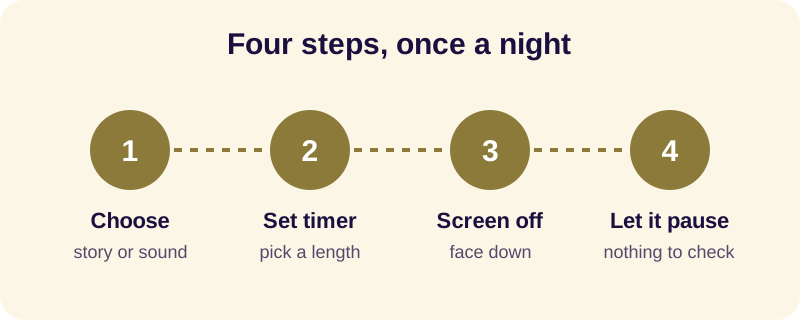
- Pick a story or sound before you lie down. Choose while the screen is already on for something else, so you are not deciding anything once you are trying to wind down.
- Set the sleep timer. With a length of ten, twenty, thirty or sixty minutes, the story and any background sound simply pause when time is up — nothing fades, nothing needs checking.
- Turn the screen off or lock it. Lay the phone face down or slide it just out of reach, so no notification light can land on your eyes.
- Adjust volume by feel, not by sight. Use the physical buttons on the side of the phone if you need to turn it down once you are settled.
- Let the pause be the end of the night's listening. When the timer stops the story, there is nothing left to confirm — you do not need to wake the screen to check that it worked.
What does Buddha Story do for screen-free nights?
Buddha Story is built for exactly this kind of listening: press play, lock the phone, and let the story run while the screen stays dark. The app narrates over 90 stories, including the 547 Jataka tales, episodes from the life of Siddhartha Gautama, and verses from the Dhammapada's 423 lines, all read slowly in English narration.
A Sleep Timer of ten, twenty, thirty or sixty minutes pauses the story and any background sound when time is up — it does not fade, so there is nothing for your eyes to go back and confirm. Offline Mode lets a story keep playing without a connection, and background playback means it keeps going once the screen is locked. If your evening calls for something gentler still, the app's Guided Meditation covers loving-kindness and breath awareness, and the sound mixer can layer a story with rain or singing bowls the same way you might pair sleep meditation sounds with silence.
There is no Kids Mode and no ads to interrupt a session. Buddha Story is available on Android through Google Play, with a 3-day free trial before the Monthly or Yearly plan begins.
If the bigger issue is a mind that will not stop turning over the day, pairing this kind of listening with a steadier mindfulness practice for sleep tends to help more than switching apps does. The screen was never really the whole problem — it was just the easiest thing to blame for a mind that had nowhere quieter to go. Give it somewhere quieter, in the dark, and the screen mostly takes care of itself.
Frequently Asked Questions
Can I really fall asleep without looking at my phone screen?
Yes. Choose a story or sound while the screen is already lit, set a sleep timer, then lock the phone or lay it face down. Everything after that happens through sound, so your eyes never need to open again until morning.
Why does screen light make it harder to settle?
A lit screen keeps your eyes working and your attention deciding what to look at next, which is a mild kind of alertness. Darkness removes that job entirely, leaving only something to listen to rather than something to watch or scroll.
What do I do if a notification lights up the screen during the night?
Turn on Do Not Disturb before you start listening, and keep the phone face down so any stray light does not reach your eyes. If you do see it, resist unlocking the screen — let the story or sound carry on without you.
Does a screen-free sleep app work without wifi or data?
A good one should. Download stories ahead of time using Offline Mode so a weak signal never forces you to wake the screen to reload anything, and background playback keeps the audio running once the screen is locked.