Published
Quick answer
The core of how to play audio in the background while screen is off is one setting: turn on background playback in your app, then lock the phone as usual and the sound keeps going.
Key takeaways
- Turn on background playback in the app before you lock the phone.
- A dark screen does not pause audio by itself on Android.
- Battery optimization settings can quietly stop playback overnight.
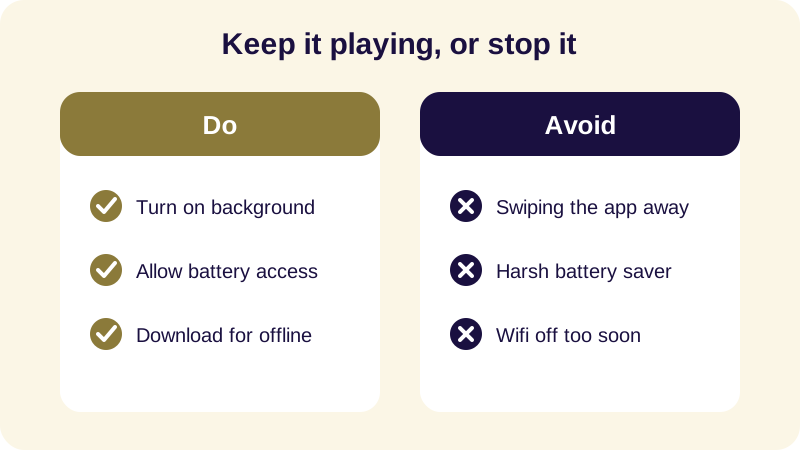
- Swiping an app from recents can close it even with background playback on.
- Offline downloads prevent a lost signal from cutting off playback.
How to play audio in the background while screen is off comes down to one setting: let the app keep running when you lock the phone, then turn the screen off as usual. Audio playback doesn't need the screen awake — it needs permission to keep running in the background, which most story and meditation apps, including Buddha Story, already have.
This matters most at bedtime, when the last thing you want is a bright screen in the room. Whether you're playing a Jataka tale, a Dhammapada verse, or plain rain sounds, the mechanics are the same across most Android audio apps. What differs is where the setting lives, and what quietly undoes it later in the night.
Why Does Audio Stop When the Screen Turns Off?
On Android, the screen going dark and an app being paused are two separate events. Audio only stops if the app itself hasn't registered as a background-audio app with the operating system, or if something interrupts it — a phone call, another app taking over the audio output, or the system deciding to free memory from an app it has decided is idle.
The confusion is understandable. Most apps you glance at during the day — a browser, a feed, a game — genuinely do stop doing anything useful once the screen goes dark, so it's natural to assume audio should too. It shouldn't. If you find lock screen audio not stopping unreliable, that's almost always a permission setting rather than a flaw in the phone itself.
How Do I Turn On Background Playback?
The steps are nearly identical across most Android audio and story apps, including Buddha Story. The setting is usually a single toggle, and once it's on you generally don't need to touch it again.
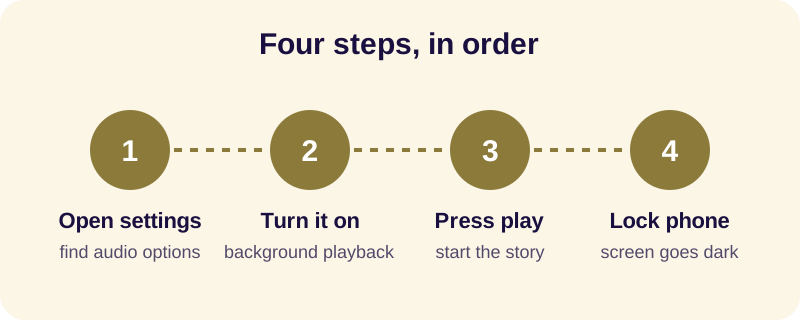
- Open the app and find its playback or background audio settings.
- Turn on background playback if it's listed as a separate toggle.
- Start playing the story or sound you want for the night.
- Lock the phone with the side button rather than swiping the app away.
- Set a sleep timer if the app has one, so playback stops on its own instead of running until morning.
Once this is set up, you can play sounds with phone locked for as long as the app allows, and the setting stays on for future sessions. You won't need to repeat these steps each night.
Why Does Background Audio Sometimes Stop Anyway?
Even with the right toggle on, audio can still cut out partway through the night. The most common cause is the phone's own battery management deciding, on its own schedule, that an app you rarely open during the day doesn't need to keep running. This is more aggressive on some Android phones than others, and it tends to show up as audio that plays fine for ten or fifteen minutes and then goes quiet without warning.
A second cause is simple human habit: reaching over, seeing the app in the recent-apps switcher, and swiping it closed out of tidiness. That gesture closes the app rather than minimizing it, which ends playback even if background playback is enabled. The fix for both is the same — leave the app alone once it's playing, and let the phone's screen lock do the work instead of touching the app itself.
Does Playing Audio With the Screen Off Drain the Battery?
Not meaningfully. A dark screen uses far less power than a lit one, and audio playback on its own is a light task for the phone's processor. If your goal is to keep audio playing screen off for a full night without worrying about the battery in the morning, the simplest safeguard isn't to avoid background playback — it's to limit how long it runs.
Downloading what you plan to listen to, rather than streaming it live, also helps — it removes the small, steady cost of a live connection and means a weak signal in the bedroom can't interrupt anything partway through.
How Does Buddha Story Keep Playing After You Lock the Phone?
Buddha Story is built around exactly this situation: a phone face-down on the nightstand, screen off, story still going. Background playback is on by default, so locking the phone doesn't pause anything, and the sleep timer stops playback cleanly at the length you chose rather than fading it out. Offline Mode lets you download Jataka tales, Dhammapada verses, or the sound mixer's rain and singing bowls ahead of time, so a dropped connection in the middle of the night never cuts a story short.
If you'd rather listen without ever touching the screen again once you press play, see our guide on falling asleep without screen time. And if your main concern is a shaky connection rather than a locked screen, the guide on listening to sleep stories offline covers downloading ahead of time in more detail.
None of this requires technical skill — it's a setting you check once, a habit of locking rather than swiping, and a timer so the phone eventually goes quiet on its own.
Frequently Asked Questions
Why does my audio stop when I turn off my phone screen?
Usually because the app's background playback setting is off, or your phone's battery management is pausing it to save power. Most story and sound apps are built to keep running with the screen off; check the app's settings for a background audio toggle, and make sure battery optimization isn't restricting it.
Does playing audio with the screen off use more battery?
No. Playing audio uses roughly the same amount of battery whether the screen is on or off, and a dark screen actually uses less power overall than a lit one. Using a sleep timer so playback stops after a set period uses even less over a full night.
Will locking my phone pause the Buddha Story app?
No. Buddha Story supports background playback, so locking the phone and letting the screen go dark does not stop the story or sounds. Playback continues until you pause it, the story ends, or the sleep timer you chose reaches its limit and pauses everything.
Can I play audio in the background without an internet connection?
Yes, if the app offers offline listening. Download the story or sounds first while connected, then lock the phone or switch on airplane mode — playback continues from the downloaded file without needing a live connection, which is useful in a dark bedroom with weak signal.