Published
Quick answer
An app for background sleep sounds while working should offer looping ambient sound, background playback and offline listening with no ads. Buddha Story's sound mixer of rain, ocean waves and singing bowls can run quietly at a desk, though the app itself is built mainly for bedtime.
Key takeaways
- Background playback keeps sound running when you switch apps or lock the screen.
- Offline mode avoids data use and dropouts during a workday.
- A sound mixer lets you blend rain, waves or singing bowls to mask office noise.
- No ads means no sudden jingle breaking your concentration.
- Narrated stories compete for attention; plain ambient sound usually suits work better.
An app for background sleep sounds while working is really two different jobs wearing one name: sound to help you fall asleep at night, and sound to help you stay steady at a desk during the day. The two overlap more than people expect, but they are not identical, and knowing the difference saves you from picking the wrong tool for the afternoon.
This article looks at what actually matters in that kind of app, what to expect from Buddha Story specifically, and how to set sound up so it helps your concentration instead of quietly undoing it.
What should an app for background sleep sounds while working actually do?
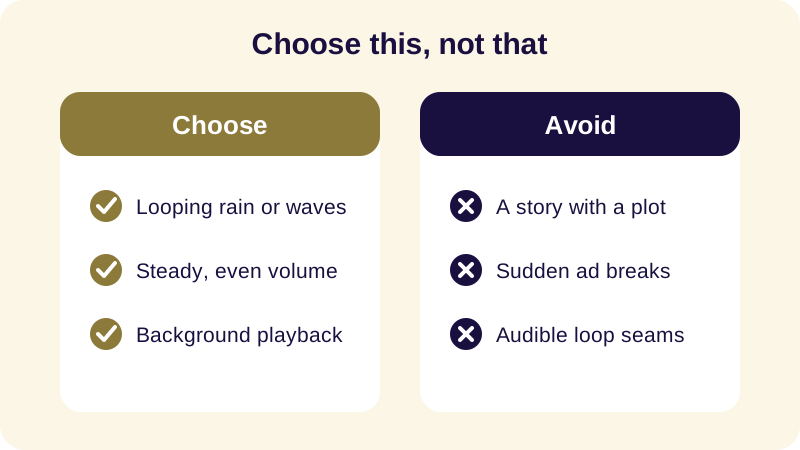
At a desk, sound has one job: sit underneath everything else without asking for attention. That rules out a few things people assume they want. A sudden ad breaking in, a track that loops with an audible seam, or a narration that unfolds a plot — all of these pull a small slice of your attention away from the work, even if you do not notice it happening.
What actually helps is closer to white noise with texture: rain, ocean waves, the low ring of a singing bowl. These sounds have no beginning or end to track, no words to parse, and no story to follow — which is exactly why they can run for an hour without becoming a distraction themselves. Sleep meditation sounds like these were designed for stillness at night, but the same qualities that make them unobtrusive in a dark bedroom make them unobtrusive at a desk too.
Can Buddha Story work as background sound while you're at your desk?
Buddha Story is built first for bedtime: it narrates Jataka tales, episodes from the life of the Buddha, Dhammapada verses and Zen parables, meant to be heard slowly in a dark room. That said, the parts of the app that make it good for sleep — a sound mixer of rain, ocean waves and singing bowls, background playback, offline listening and no ads — do not stop working just because the sun is up.
See also: App With Guided Meditation and Sleep Sounds Combined.
The honest way to use it at work is to reach for the sounds on their own, without the narration. Open the mixer, pick rain or a singing bowl tone, let background playback carry it through your other apps, and leave the stories for later. That is a different use of the same features than the one they were designed for, and it is a reasonable one.
Which sounds work best for a work day rather than a bedtime routine?
Among the three common choices, rain is the most forgiving: it masks office chatter and keyboard noise without drawing notice to itself. Ocean waves have a slower rhythm, which some people find too close to a lullaby for a working afternoon. A singing bowl, left to ring and fade, works well in short stretches but is less suited to running for hours unbroken, since its tone is more distinct than white noise.
If you want something with more structure than plain sound but still lighter than a story, a short guided breath-awareness session between tasks is worth trying rather than during them. It is a break, not a backdrop — useful at the top of the hour, not underneath a call. For that kind of short reset, see our guide to an app for breath awareness meditation.
How do you set background sound up without breaking your focus?
A few small choices make the difference between sound that helps and sound that becomes one more tab fighting for your attention.
- Pick one looping ambient track rather than a mix of several competing sounds.
- Set the volume low enough that a colleague's voice or a notification still cuts through easily.
- Turn on background playback so the sound keeps running while you work in other apps.
- Download the track for offline listening if your office wifi is unreliable.
- Save narrated stories for later, when you can actually give them your attention.
Offline listening matters more during the workday than most people expect, since office networks often throttle streaming audio during busy hours. If you want more detail on downloading ahead of time, our guide on how to listen to sleep stories offline covers the same offline mode, even though it is written with bedtime in mind.
Is it worth using a bedtime app during the day at all?
It depends on what you are actually looking for. If you want pure background texture — rain, waves, a bowl's tone — a bedtime app's sound mixer does that job as well during the day as it does at night, since the sounds themselves do not know what time it is. If what you are really after is a short break from the screen, a few minutes of breath awareness or a guided pause serves that better than any ambient loop.
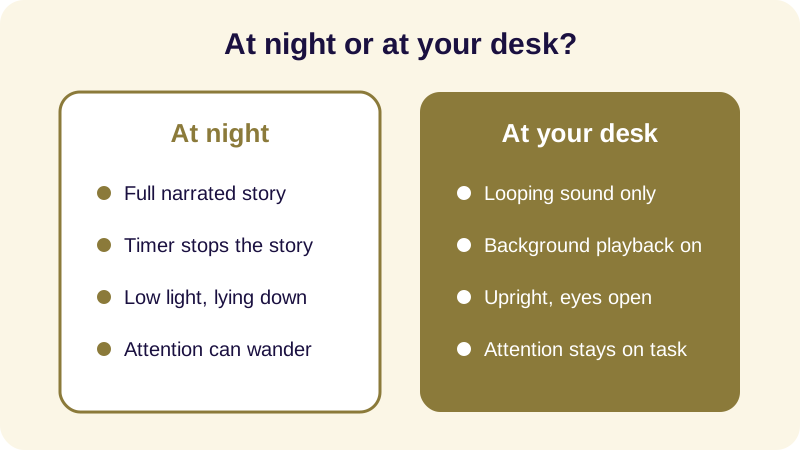
What does not transfer well is the narrated story itself. Those are built to be followed slowly, with nowhere to be and nothing else competing for your ear, which describes an evening far more than a Tuesday afternoon. Keep the two uses separate — sound for the desk, story for the pillow — and both will do their job better.
For a fuller look at how Buddha Story compares on sound, offline listening and timers, see our rundown of the best Buddhist sleep apps, which covers the same mixer and playback features discussed here from the bedtime side.
Frequently Asked Questions
Is Buddha Story meant to be used while working?
It is built mainly for bedtime listening, but its sound mixer of rain, ocean waves and singing bowls, plus background playback and no ads, also works well as quiet ambient sound at a desk during the day.
What's the difference between sleep sounds and background sounds for focus?
Sleep sounds are usually paired with a slow narrated story and a timer that stops everything so you can drift off. Background sounds for focus are looped, wordless, and meant to run steadily in the background without asking for your attention.
Can I listen to narrated stories while working, or just plain sound?
A narrated story asks your mind to follow a plot, which competes with concentration. For work, plain looping sound like rain or singing bowls, without narration, tends to sit in the background without pulling focus away from the task in front of you.
Does background playback keep the sound going when I switch apps?
Yes. Background playback means the sound keeps running when you lock the screen or open another app, so you are not stuck with the app open on screen the whole time you are trying to work.
Can I use it offline in a low-signal office?
Yes. Offline mode lets you download sounds and stories in advance, so a weak office connection or no wifi does not interrupt the sound partway through your workday.