Published
Quick answer
How to play ocean sounds overnight: open a sound mixer, add ocean waves, turn on background playback and offline mode, then set a sleep timer so the sound stops instead of running until morning.
Key takeaways
- A sound mixer with ocean waves plus background playback keeps the sound going after the screen locks.
- Offline mode or a downloaded file stops a weak signal from cutting the sound mid-night.
- A sleep timer with set lengths pauses the sound cleanly instead of fading it out.
- Moderate volume and keeping the phone off the pillow make overnight listening easier on you.
- Ocean waves can be layered under a slow story or guided meditation for a fuller wind-down.
Here's how to play ocean sounds overnight: turn on a sound mixer that includes ocean waves, switch on background playback and offline mode, then set a sleep timer so the sound stops itself instead of running on until sunrise.
You don't need a special speaker or a dedicated white-noise machine for any of this. The same four settings that keep a phone quietly looping ocean waves all night work whether you're using a general sound app or something built specifically for bedtime listening, like Buddha Story's mixer.
How do I play ocean sounds overnight on my phone?
On most phones this comes down to four settings working together: a sound mixer that includes ocean waves, background playback so the audio survives a locked screen, offline mode so a dropped connection doesn't cut the sound, and a sleep timer so it eventually stops on its own.
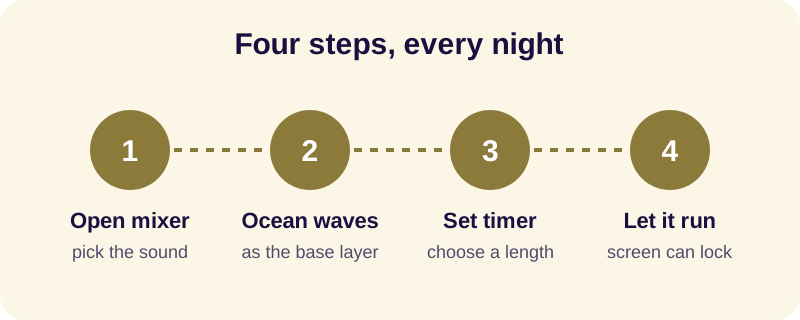
- Open the sound mixer and select ocean waves as the base layer.
- Turn on background playback so the sound keeps going once the screen locks.
- Switch on offline mode, or download the sound in advance if your signal is weak.
- Set the sleep timer to the length you actually want before you lie down.
- Put the phone face down on the nightstand, turn on Do Not Disturb, and let it run.
Background playback matters more than people expect, because it's the single setting that decides whether the sound survives a locked screen at all. If ocean waves keep stopping the moment your phone goes dark, that's almost always a background-playback or battery-saving setting, not a problem with the sound itself — the fix is covered in more detail in how to play audio in the background while the screen is off. If you're curious why the sound of waves settles a mind at night in the first place, that's a separate question answered in why ocean sounds help you relax.
How long should ocean sounds play while I'm asleep?
Most people don't need ocean sounds running until morning; they need enough of it to fall asleep, after which an endless loop is doing nothing for anyone except the battery. A sleep timer with a handful of set lengths — short, medium, longer and an hour-ish option — covers nearly everyone without asking you to type an exact number every single night.
Buddha Story's sleep timer works this way: it offers 10, 20, 30 or 60 minutes, and at the end it simply pauses the sound rather than fading it out. Pick a length based on how long it usually takes you to drift off, not on how long you'd like to sleep — the timer's job is to cover the falling-asleep part, not the whole night.
Will ocean sounds keep playing if my screen is off or I lose wifi?
These are two separate problems with two separate fixes. A screen going dark is a background-playback setting; a dropped connection is an offline-mode setting, and mixing the two up is why people sometimes "fix" the wrong thing and still wake up to silence at 3am.
If your phone locks the screen and the sound stops within a few seconds, check background playback first — most apps have a toggle for it, and the phone's own battery optimisation settings can override it unless you allow the app to run in the background. If the sound stops later, in the middle of the night, that's more often a signal problem: wifi dropping as the router idles, or mobile data switching off to save power. Downloading the sound ahead of time, or turning on offline mode before bed, removes that risk entirely — the same approach covered for stories in how to listen to sleep stories offline.
What's the safest way to let ocean sounds play all night?
There's no single rule here, but a few habits make overnight listening easier on you without turning it into a chore: moderate volume rather than loud, a timer instead of an endless loop, and a little physical distance between the phone and your ear.
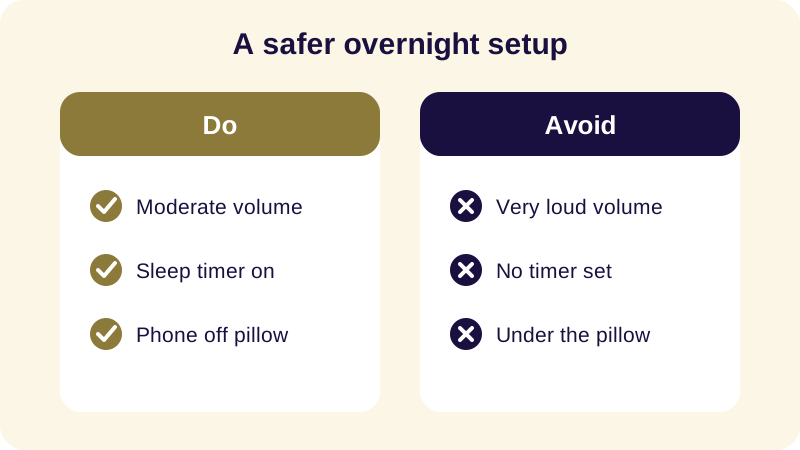
None of this replaces proper medical advice. If falling or staying asleep is a persistent, ongoing struggle rather than an occasional restless night, that's worth raising with a doctor — ocean sounds are a comfort for an ordinary evening, not a treatment for anything.
Can I pair ocean sounds with a story or a guided meditation?
Yes, and many people find this works better than ocean sounds alone. A sound mixer lets you set ocean waves as a quiet base layer underneath a narrated voice, so the waves stay in the background while the story or meditation carries the foreground, and both stop together when the timer ends.
If you'd rather fall asleep to a slow Jataka tale or an episode from the Buddha's life with the ocean underneath it, see Buddhist stories for sleep. If you'd prefer a guided practice instead of a story, metta meditation for restful sleep walks through a loving-kindness practice that pairs the same way. And if you want to compare ocean waves against other ambient options like rain or singing bowls before you decide, sleep meditation sounds covers the differences.
Playing ocean sounds overnight isn't complicated once the four settings are in place. Set the mixer, allow background playback, go offline, and let a timer decide when it ends — then the only thing left to do is close your eyes.
Frequently Asked Questions
How do I play ocean sounds overnight on Android?
Open a sound mixer, choose ocean waves as the base sound, turn on background playback so it survives a locked screen, switch on offline mode if your connection is weak, and set a sleep timer before you lie down so the sound stops on its own.
Will ocean sounds stop by themselves or play until morning?
That depends on whether you set a timer. Without one, most apps will keep looping the sound all night. With a sleep timer set to a fixed length, the sound simply pauses when the time is up rather than fading or playing on unattended.
Can I play ocean sounds overnight without wifi?
Yes, if you turn on offline mode or download the sound beforehand. Streaming over a weak signal is the most common reason ocean sounds cut out partway through the night, so downloading ahead removes that problem entirely.
Is it safe to leave ocean sounds playing all night?
For most people, moderate volume with a timer and the phone kept off the pillow is a reasonable overnight setup. This is general comfort advice, not medical guidance; if sleep problems are persistent or severe, speak with a doctor rather than relying on sound alone.
Can I combine ocean sounds with a bedtime story?
Yes. A sound mixer lets you layer ocean waves underneath a narrated story or a guided meditation, so the waves sit quietly in the background while the voice carries the foreground, and both can be set to stop together at the same timer.